
A Google Business Profile helps an MSP show up in local and map results for searches like "managed IT services near me." Set it up with a verified address or service area, a primary category of managed service provider, a clear services list, and a steady process for collecting and answering client reviews.
By the time a buyer reaches your website, they have usually formed a view. It came from review sites, community threads, competitor pages and, more and more, from what an AI assistant said about your category. You control almost none of these surfaces. You can be present and consistent on them.
Your Google profile is one of the few you can work directly. For a local or regional MSP, it is often the first thing a buyer sees. Most MSPs treat it as a listing someone created years ago. We treat Google Business Profile for MSPs as a revenue surface with its own setup, categories, review process and measurement.
How do you set up an MSP profile?
The problem is familiar. You suspect prospects check you on Google Maps before they call, and you don't know whether your profile helps or hurts. The profile is probably half finished.
Consistency is the principle here, not a one-off task. Your business name, address and phone number should match your website and other listings exactly. Mismatches weaken trust with buyers and with the systems that read your data. This matters most after a merger, an office move or a rebrand.
Paid search covers intent that the map results won't. It should draw on the same business data, so both channels tell one story.
Setting up Google Business Profile for MSPs works best in this order:
- Claim or create the profile. Search for your business first. A duplicate listing splits your data and confuses buyers.
- Verify ownership. Google will ask you to prove the business is yours. Until you do, you can't control the profile properly.
- Choose address or service area. If clients visit your office, show the street address. If you serve clients at their sites or remotely across a region, set a service area and hide the address.
- Add hours and a contact link. Use a booking or contact page, not just your homepage.
- Write a short description. Say who you serve and what you run for them, in plain words.
Which categories should an MSP choose?
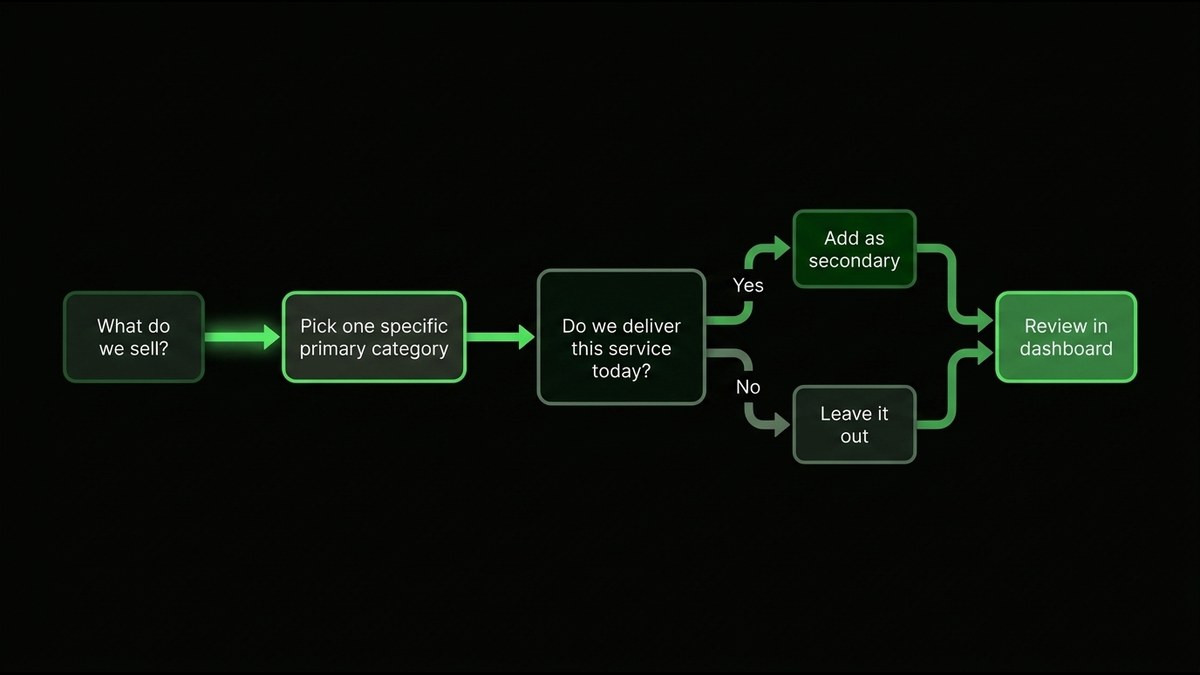
Start with the primary category. It carries the most weight in how Google matches your profile to a search. Choose the most specific one that describes what you sell. For most MSPs that means a managed service provider or IT services category.
Then add a small number of secondary categories. Add one only if you deliver that service today. Each extra category should reflect real work you could scope and staff this month.
Aspirational categories cause two problems:
- They attract searches from people who want something you don't sell, such as a one-off repair or consumer device help.
- They dilute the match between your profile and the searches you want.
Why do wrong-fit categories cost you sales time?
Wrong-fit calls cost sales time, and they teach the profile the wrong lesson about who you are for.
Category names change over time. Confirm the exact options in your live dashboard before you commit. Don't rely on a list from an article.
If you can't describe a category in one sentence of client work, it doesn't belong on the profile. The same discipline applies to your services list.
How should an MSP keep a profile current?
List the services you actually sell, in the words a buyer would use. "Co-managed IT support" and "cybersecurity monitoring" beat internal product names. Add photos of your team and office, short updates, and answers to the questions prospects ask.
Then keep a rhythm. A profile that is set up once and never touched reads as inactive to buyers. It also gives Google little fresh data. The same profile data feeds local results and AI-driven recommendations, so a neglected profile hurts you in both places.
Run it like any other system. Assign an owner, set a monthly check, and log what changed.
There is a simple test for the AI side. Ask the assistants your buyers use to describe your category and then your firm. Check whether the answer is accurate. If it names the wrong services or the wrong region, fix the source data first: your profile, your website and your listings. Sometimes the answer is simply accurate, and then you know where you stand.
Paid search also reads your service language, so a plain-language service list helps there too.
How do MSPs get reviews that hold up?
In Google Business Profile for MSPs, business clients rarely leave public reviews on their own. The reviews you do have then skew toward complaints. A process fixes this.
Make the process repeatable. Name one person who owns requests. Add the ask to the close-out step of projects and resolved incidents. Send a direct link to the review form. Log replies and time to reply.
Your paid campaigns send buyers to the same profile, so reviews affect that spend too.
- Ask at the right moment. Ask when the client has just seen value, such as a clean migration or a resolved incident. Don't ask at renewal, where the request reads as transactional.
- Reply to every review. Respond to negative reviews specifically and without defensiveness. Prospects read your response more closely than the complaint. It shows what happens when something goes wrong, and that is exactly what they are trying to de-risk.
- Watch recency. Judge volume, average rating and recency against named competitors in your area. A high rating built on old reviews reads as decline. Steady recent reviews beat a strong score from three years ago.
- Read repeated complaints as service feedback. If several reviews raise the same issue, such as slow response on tickets, that is not a messaging problem. It is service feedback arriving through an unusual channel. Treating it as a PR issue wastes the signal.
How do you know your profile is working?
Track actions that signal intent: calls, direction requests and website clicks. Treat profile views as a weak signal. A view tells you someone saw you, not that they wanted you.
Tag the website link on your profile so visits appear as their own source in analytics. Then map those visits to the events that matter, such as a form submit or a booked call. Without that mapping, the profile never connects to consultations.
Here is what we see in our own profile reporting. Weekly figures sit on a small base, so they swing sharply. A rise or drop of a few interactions can look dramatic in percentage terms and mean very little. Recent weeks also get revised days later, so a number you reported on Monday may change by Friday. We have seen a steep one-week drop with no known cause, and a steep one-week rise that was a handful of extra actions.
So read trends across several weeks. Direction requests and calls are better signals than views. Keep them next to the business results you can verify.
For the organic side, pair profile data with Google Search Console data on branded queries. Rising branded search is a clean sign that regard for your name is growing.
What should you do next?
Google Business Profile for MSPs is one surface in a larger system. Verified data, the right categories, a review process and measurement all have to agree with your website and your paid search campaigns. When they don't, buyers see gaps before you ever speak to them.
Our maturity diagnostic reviews the stack, maps the process and checks attribution. It then turns the findings into a scored roadmap and a build scope. Paid search is the natural partner to the profile. It captures intent the map results miss, and we run it with negative-keyword discipline and revenue-based tracking.
If your profile, tracking and paid search aren't working as one system, that is the conversation to start.
- ✓ Verify the profile, pick address or service area deliberately, and keep your name, address and phone identical everywhere.
- ✓ Choose one precise primary category and a few honest secondaries, and list nothing you don't deliver.
- ✓ Plain-language services, a named owner and a monthly check keep the profile alive for buyers and for AI answers.
- ✓ Ask for reviews when value is fresh, reply to every one, and keep them recent.
- ✓ Judge the profile on intent actions over several weeks, and tie them to consultations through tagged links and events.
FAQ
Should an MSP show its street address or set a service area on Google Business Profile?+
If clients visit your office, show the street address. If you serve clients at their sites or remotely across a region, set a service area and hide the address.
Which primary category should an MSP choose on Google Business Profile?+
Choose the most specific category that describes what you sell. For most MSPs that is a managed service provider or IT services category. Confirm the exact options in your live dashboard, because category names change over time.
How many secondary categories should an MSP add?+
Add a small number, and only for services you deliver today. Each one should reflect real work you could scope and staff this month. Aspirational categories attract wrong-fit calls and dilute the match with the searches you want.
When is the best time to ask an MSP client for a Google review?+
Ask when the client has just seen value, such as a clean migration or a resolved incident. Avoid asking at renewal, where the request reads as transactional.
How should an MSP respond to negative Google reviews?+
Reply specifically and without defensiveness. Prospects read your response more closely than the complaint, because it shows what happens when something goes wrong.
Which Google Business Profile metrics matter most for an MSP?+
Calls, direction requests and website clicks signal intent, while profile views are a weak signal. Read trends across several weeks, because weekly figures sit on a small base and recent weeks are often revised days later.