
A B2B cold email template library works when each email in a five-touch sequence has one job: open with a specific reason to write, add proof, handle a likely objection, offer something useful, then close the loop. Templates give structure. List fit and offer decide whether anyone replies.
Most outbound sequences fail on structure, not copy. The cold email templates B2B teams pass around fix the wording and leave the real bottleneck alone.
If you run an SDR team, you know the pattern. Reps write their own emails, quality varies, and volume goes out against a loose ICP. Replies arrive, but few turn into meetings. Forecasts swing because the outbound feed is uneven. If your sequence is already live, start by auditing it in order, then come back for the copy.
This guide gives you five templates, one per touch, and the reasoning behind each. It also covers what to fix before you send anything.
What makes cold email templates B2B work?
Three things sit above the copy: a list that fits your ICP, an offer buyers want, and follow-up that adds something new each time. A template only organizes the message. If those three are wrong, no wording recovers the reply rate.
Run this pre-send checklist before any rep opens the library:
- List fit. Every contact matches a defined ICP and has a real reason to care now. A stale or bought list burns sender reputation faster than any sequence can recover.
- Offer. You are offering something a buyer in this segment wants, stated in one sentence. No sequence fixes an offer buyers do not want.
- Sending setup. Authentication, list hygiene and sending reputation are part of setup, not an afterthought. We handle all three before a sequence goes live.
- Permission and opt-out. Mailbox providers require authentication and an easy way to unsubscribe. Build both into every email.
Why relevance beats volume, and the objection about sounding generic
In our work with B2B teams, the bottleneck is rarely reach. It is fit and follow-up. Teams that measure sends instead of meetings usually have a relevance problem, not a volume problem.
The same logic holds in paid channels. In a targeted PPC engagement for an employee-experience platform, the lever was lead quality, not more clicks. Paying for leads that rarely convert is a fit problem. Sending more email to a weak list is the same problem.
Now the objection: "Templates make us sound like everyone else, and buyers can tell." That is true when the template carries the specifics. Ours do not. A template fixes the structure. The rep fills in the trigger, the proof and the objection. Those three fields are where an email stops sounding generic.
How many touches fit an email cadence?
Five touches is a workable starting design. It gives enough follow-up to catch buyers who missed the first email, and it stops before follow-up turns into pressure. Follow-up drives most replies, so a single email wastes the list. Treat the count and spacing as a hypothesis, then adjust against meetings booked per sequence.
Here is the five-touch overview. The day spacing is an illustrative starting point to test, not a benchmark.
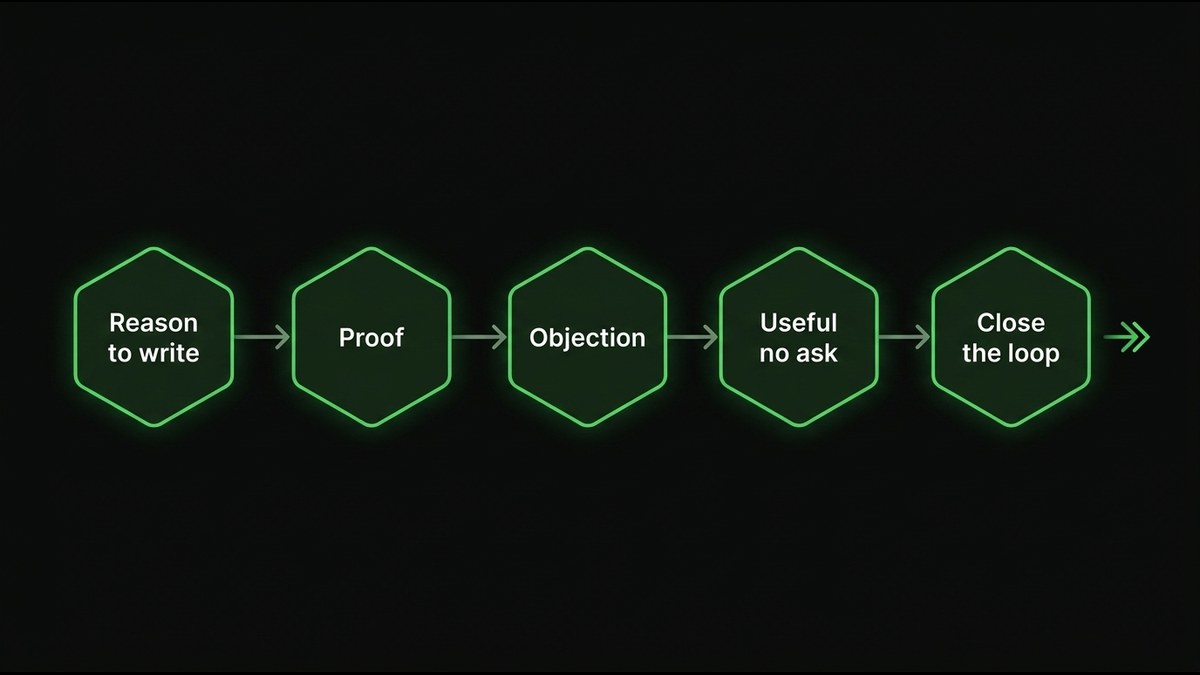
- Touch 1, Reason to write. Job: one specific observation tied to a trigger or ICP detail. When: Day 1. Ask: a low-effort question, never a calendar slot.
- Touch 2, Proof. Job: one concrete proof point mapped to their problem. When: Day 4. Ask: whether the problem looks familiar.
- Touch 3, Objection. Job: name the likeliest objection and reframe it. When: Day 8. Ask: whether that is the real blocker.
- Touch 4, Useful, no ask. Job: give a short checklist, teardown or observation. When: Day 13. Ask: none.
- Touch 5, Close the loop. Job: end politely and offer a route to the right person. When: Day 19. Ask: a referral or an opt-out.
Why each touch needs one job
Each step has one job and adds something new. A follow-up that says "just bumping this" adds nothing, and buyers read it that way.
Keep volume per domain conservative. A tidy email cadence on a damaged domain still lands in spam.
Outbound sequence templates for each of five touches
Touch one gives a specific reason to write. Touch two adds proof. Touch three handles the likeliest objection. Touch four offers something useful with no ask. Touch five closes the loop politely. Each email carries one job and one low-effort question. These outbound sequence templates use {{double braces}} for the fields a rep must fill in.
Touch 1: Give a specific reason to write
Tie the email to one observation about the trigger or ICP detail. Add one line on what you do for similar companies, then ask one easy question. Do not open with "Quick question" or "Congrats on the funding round," and do not ask for a calendar slot yet.
Subject: {{trigger}} at {{company}}
Hi {{first_name}},
I noticed {{specific observation, e.g. you are hiring three SDRs while the pipeline page lists one product line}}. Teams in that spot often find the new reps send plenty of email but few replies turn into meetings.
We help {{similar company type}} tighten who gets contacted and what the first email says.
Is {{problem area}} something you own, or is someone else closer to it?
{{sender_name}}. If this is not relevant, reply "no" and I will not follow up.
No known contact? Swap the last question for a referral request: "Who on your team owns {{problem area}}? A name is enough, and I will take it from there."
Why it works: The observation proves you looked. The question costs the reader almost nothing. Swap it when you have no trigger. Use a role-level detail instead.
Touch 2: Add proof
Map one concrete proof point to the prospect's problem. Do not stretch it. If you have no result you can publish, use a process detail instead.
Subject: Re: {{trigger}} at {{company}}
{{first_name}}, one example that may be close to your situation.
{{similar company type}} had {{problem}}. After {{what changed}}, they saw {{specific result}}.
Does that match what you are seeing at {{company}}?
{{sender_name}}
Why it works: Proof reduces the risk of replying. Swap it when the proof is from a different segment. Use a looser version and say so.
Touch 3: Handle the likeliest objection
Name the objection before the buyer does. Then reframe it in two sentences.
Subject: {{company}} and {{objection topic}}
{{first_name}}, you may already have {{a process / a vendor}} for this.
Most teams do. The question is whether it covers {{gap}}. That is usually where {{problem}} comes from.
Is that the real blocker, or is it timing?
{{sender_name}}
Why it works: Naming the objection shows you have heard it before. Swap it when your sales calls show a different objection. Use that one.
Touch 4: Offer something useful, no ask
This is where you earn the next open. A short checklist, teardown or observation keeps your product present between touchpoints. For long B2B sales cycles, that presence matters, because every send spends attention you have not yet earned.
Subject: A short checklist for {{problem area}}
{{first_name}}, no ask this time.
Here are three things we check when {{problem area}} stalls: {{item one}}, {{item two}}, {{item three}}.
Use it however helps. If you want the longer version, say so.
{{sender_name}}
Why it works: It gives before it asks. Swap it when you have a teardown of their own site or funnel. That beats any checklist.
Touch 5: Close the loop
Keep it short and respectful, with an easy opt-out and an offer to route to the right person.
Subject: Closing the loop on {{problem area}}
{{first_name}}, I will stop here so I do not clutter your inbox.
If {{problem area}} is not yours, who should I speak to? If it is not a priority, I will leave it.
{{sender_name}}
Post-rapport variant, for when the buyer has replied before and gone quiet: "{{first_name}}, we spoke about {{topic}} on {{date}}. I will pause there unless something has changed. If it has, reply with one line and I will pick it up."
Why it works: A polite close often draws a reply that the earlier touches did not. Swap it when the buyer asked you to return later. Set a dated follow-up instead.
How to adapt for SaaS, fintech, manufacturing, industrial?
Keep the five-touch structure and swap the trigger, the proof and the objection for each industry. The reason to write changes. The structure does not.
- B2B SaaS. The buyer worries about attribution blind spots and unpredictable pipeline. Trigger on a hiring push or a new product line. Proof should show pipeline clarity.
- Fintech. The buyer struggles with unclear go-to-market ownership. Trigger on a new market or a change in the commercial team. Objection: "Compliance slows everything down." Reframe around what stays in your control.
- Manufacturing. The buyer has distribution but no scalable commercial engine. Trigger on dependence on a founder or a few key accounts. Proof should show a commercial engine that scales without the owner.
- Industrial services. The buyer sells on relationships, not systems. Trigger on a change in account leadership. Objection: "Our customers buy on trust." Reframe so the system supports that trust instead of replacing it.
What experience sits behind these templates
We work with B2B SaaS, fintech and industrial firms, and the pattern holds: the structure travels, the specifics do not. We have influenced $470M+ across 70+ B2B teams over 15+ years, reported against pipeline, not vanity metrics. That is the lens behind these templates, not a result of them.
We run B2B email marketing wired into CRM and revenue reporting, so sequences are judged against pipeline rather than opens.
Done for you cold email: what is included?
Done for you cold email means an outside team builds and runs the outbound system: list building, sending setup and authentication, sequence copy, and reporting to pipeline. It fits teams that have an offer that works but lack the capacity or technical setup to run outbound well.
Our approach is senior strategy plus in-house build. We write the code and ship the system, not just slides. We wire sequences to real behavior and scoring through your automation platform, so triggers fire from intent. Every engagement is handed over with documentation, playbooks and training. You keep the system.
Outsourcing is not always right. If your offer or ICP is unclear, fix that first. An outside team can only run what you can define. If you plan to run outbound in-house, the tooling decision is the next thing to settle, starting with how to choose email sequence software.
How do you measure a cold email sequence?
Measure meetings booked, qualified opportunities and pipeline per sequence, tied to your CRM. Open rates are unreliable and say little about intent. Watch bounces and spam complaints as deliverability health, and compare reply quality by list segment, not just reply count.
Our outbound channel reporting follows the same rule. Every flow is measured to pipeline, not opens. Build the report in this order:
- Meetings booked per sequence. The number your CRO reads first.
- Qualified opportunities. Shows whether meetings fit your ICP.
- Pipeline created. Ties the sequence to revenue.
- Bounces and spam complaints. Deliverability health, not performance.
- Reply quality by segment. A thousand replies from the wrong segment are worse than fifty from the right one.
What email can and cannot do
Your own CRM gives you better conversion examples than any borrowed benchmark. Compare sequence versions against meetings per contact and let that decide which template stays.
Be honest about what email cannot do. It nurtures demand you already have. It does not manufacture it. It is a compounding channel, not a quick blast for a quarterly number. LinkedIn can support email, but it does not replace it.
Pair outbound with intent capture for buyers who are not on your list yet, such as paid media built to generate SQLs rather than low-intent clicks.
Next step
Templates organize the message. The list, the offer and the sending setup decide the result. If your reps have templates and the replies still do not turn into meetings, the problem sits above the copy. Send us the sequence, the ICP and the offer. We will tell you where fit and follow-up break down.
- ✓ Fix the list, the offer and the sending setup first, because a template only organizes what you already have.
- ✓ Start with five touches, give each one job, and let meetings per sequence tell you when to change the count.
- ✓ Use one job per email and one easy question, and make every follow-up add something the last one did not.
- ✓ Change the trigger, the proof and the objection per industry, and leave the five-touch structure alone.
- ✓ Judge every sequence by meetings and pipeline in your CRM, and treat opens as noise.
FAQ
What makes a cold email template library work?+
Each email in the sequence has one job: a specific reason to write, proof, objection handling, something useful, then a polite close. The template supplies structure, but a list that fits your ICP and an offer buyers want decide whether anyone replies.
How many touches should a B2B cold email sequence have?+
Five touches is a workable starting design. It gives enough follow-up to catch buyers who missed the first email and stops before follow-up becomes pressure. Treat the count and day spacing as a hypothesis and adjust against meetings booked per sequence.
Do cold email templates make you sound generic?+
Only when the template carries the specifics. A good template fixes the structure, while the rep fills in the trigger, the proof and the objection. Those three fields are what keep an email from sounding like everyone else's.
What should you check before sending a cold email sequence?+
Confirm that every contact matches a defined ICP with a reason to care now, that your offer fits in one sentence, and that authentication and list hygiene are in place. Every email also needs an easy way to unsubscribe.
What does done for you cold email include?+
An outside team builds and runs the outbound system: list building, sending setup and authentication, sequence copy, and reporting to pipeline. It suits teams with an offer that works but without the capacity or technical setup to run outbound well.
How do you measure whether a cold email sequence is working?+
Track meetings booked, qualified opportunities and pipeline created per sequence in your CRM. Watch bounces and spam complaints as deliverability health, and compare reply quality by segment. Open rates say little about intent.