
A revenue operations tech stack audit inventories every tool that moves a lead to closed revenue, maps each tool's data flows and owner, then keeps, merges or retires it based on usage, overlap and cost. Tool sprawl is an ownership problem, not a purchasing problem, so the goal is fewer undefined handoffs rather than simply fewer tools. A tool earns its place when it has one named owner, does not duplicate another tool, feeds the CRM or a pipeline report, and costs what its actual usage justifies.
You inherited this stack. It may have arrived with an acquisition, grown through country-by-country buying, or reflect a predecessor's choices. Either way, sales, marketing and customer success each report a different pipeline number, and you own the forecast.
Fragmentation does not fix itself. Each new tool adds another place where a definition can drift. This guide treats the revenue operations tech stack as a system: what it contains, how to audit it, what to cut, and how to keep it cut.
We argue one point throughout. Tool sprawl is an ownership problem, not a purchasing problem. Fewer tools is not the goal. Fewer undefined handoffs is. That reframes MarTech consolidation and stack optimization: both start with ownership and data flow, not with a cheaper contract.
What is a revenue operations tech stack?
A revenue operations tech stack is the set of connected systems that capture, route, score, track and report on revenue, from first touch to renewal. Data flow defines it, not vendor count. A tool belongs in the stack only if its data reaches the CRM or the pipeline report.
We read the stack as operators, not as cataloguers. Effiqs builds RevOps as client-owned infrastructure, inside the tools themselves: CRM architecture, tracking, automation and attribution logic. That view changes how you map the stack. You do not list tools by brand. You list the jobs that must happen between a lead appearing and a renewal closing.
A stack map has two halves: layers and handoffs. The handoffs are marketing to sales, sales to onboarding, and onboarding to customer success. For each core data object (lead, account, opportunity, subscription), name one system of record and one owner. Where two systems both claim an object, you have found your first audit finding.
Start with the system-of-record layer, because every other decision depends on it. If you are weighing a CRM replacement, compare peer-reviewed capability and implementation readiness in Gartner's CRM reviews rather than relying on vendor claims. Treat those reviews as one input. Your own data-flow map is the better test.
Once the layers are mapped, hygiene becomes routine rather than a project. Where HubSpot is the CRM, managed CRM hygiene and reporting keeps field definitions and pipeline stages consistent between audits.
Six layers cover most B2B tech stacks. Each has a job, a typical sprawl symptom and a usual owner:
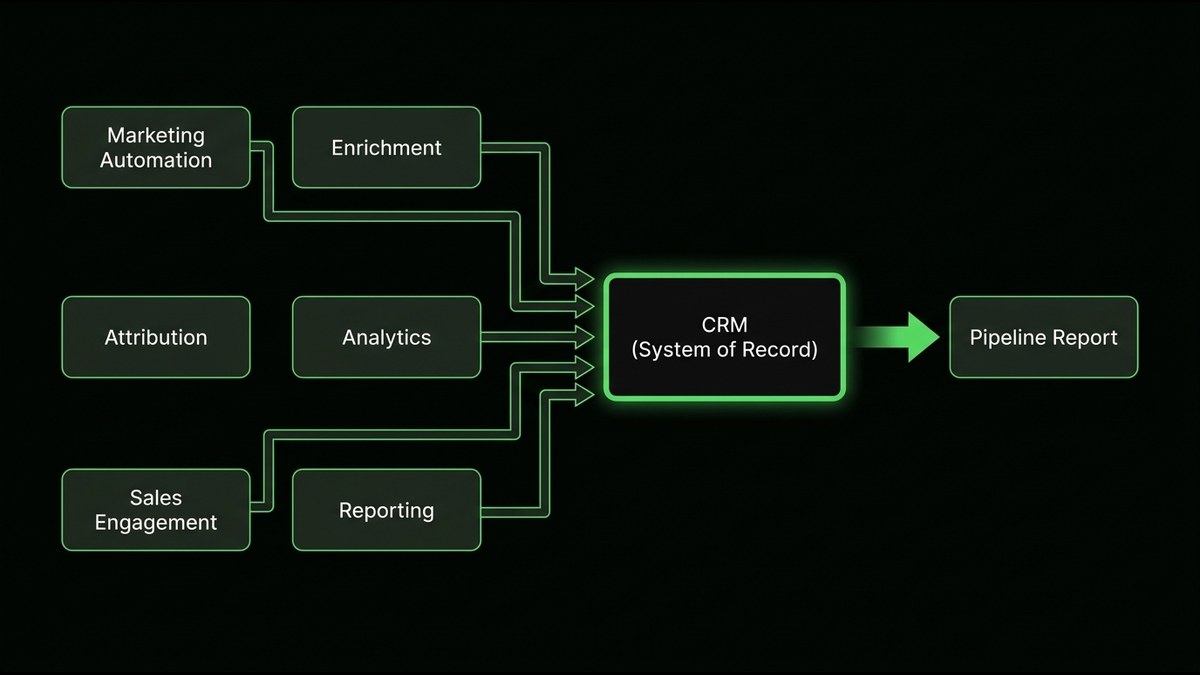
- CRM. Job: system of record for accounts, contacts and deals. Sprawl symptom: duplicate fields and competing deal-stage definitions. Usual owner: RevOps or the head of sales.
- Marketing automation. Job: capture, nurture and route leads. Sprawl symptom: overlapping workflows that fire on the same trigger. Usual owner: Marketing Ops.
- Attribution and analytics. Job: connect spend and touchpoints to pipeline. Sprawl symptom: duplicate conversion events that double-count results. Usual owner: Marketing Ops or RevOps.
- Sales engagement. Job: sequence outreach and log activity. Sprawl symptom: activity that never syncs back to the CRM record. Usual owner: the head of sales or RevOps.
- Data enrichment. Job: fill and refresh account and contact data. Sprawl symptom: several vendors overwriting the same fields. Usual owner: RevOps.
- Reporting. Job: give leadership one view of pipeline, forecast and conversion. Sprawl symptom: three versions of the same report. Usual owner: RevOps.
What is tool sprawl, and how do you know you have it?
Tool sprawl is when tools overlap in function, sit unused, or hold conflicting versions of the same data. You have it when two systems claim to be the source of truth for pipeline, reports need manual reconciliation, or nobody can name the owner of a given tool.
Sprawl is rarely a decision. It accumulates. Four sources account for most of it:
- Acquisitions. Each acquired company arrives with its own CRM, its own automation and its own definitions.
- Regional buying. Country teams buy locally, for local reasons, and nobody retires the duplicate.
- Shadow tools. A team adds a tool on a company card, solves a real problem, and never tells RevOps.
- AI add-ons. Forrester's "Will AI Eat Your RevTech Stack?" argues that AI features and agents are reshaping revtech. Many vendors now bundle them, so each one is a new way to add a tool without a decision.
What are the signs of tool sprawl?
Unused capability makes the problem worse. Teams often pay for features they never switch on, so a share of every license fee buys capability the stack never uses. That is why usage, not the price list, belongs in any audit.
The last sign on the list below is the hardest to see, so here is a common measurement example. An ad account can carry several overlapping outbound-click conversion actions that count the same visit. Each one looks fine on its own. Together they double-count results and flatter the performance story leadership hears.
Different seats feel sprawl differently. The CRO sees forecast risk. The CMO sees spend that cannot be attributed. The RevOps or Marketing Ops lead sees hours of manual reconciliation. Check your own stack against this list:
- Two systems claim to own pipeline.
- Reports need manual reconciliation before every leadership meeting.
- Nobody can name the owner of a given tool.
- Two tools write to the same field.
- Licenses renew without anyone checking usage.
- Duplicate events double-count results.
How do you run a revenue operations tech stack audit?
Run five steps: inventory every tool and its cost, map data flows between tools, score each tool, decide keep, merge or retire, then document governance. Diagnose before you cut, because removing a tool without understanding its data flow breaks reporting.
Step two deserves extra care, because measurement tools hide the most duplication. A governed tag and event foundation prevents the double-counting described earlier. If your tagging is inconsistent, start with a proper Google Tag Manager implementation before you judge any analytics tool.
Treat the audit as a decision tool, not a report that sits. A good diagnostic produces two things: a shared problem framing across stakeholders and one recommended next step. That matters because stack decisions involve several people. Sales, marketing and customer success each bought their own tools, and you often need CRO or CEO sign-off to retire anything large. A shared scorecard turns opinions into evidence.
Assign owners with one distinction in mind. A tool owner is accountable for process integrity: clean records, enforced stage rules, clear attribution ownership. A tool owner is not accountable for revenue outcomes. Mixing the two produces owners who defend their tool instead of auditing it.
You may object that you do not have time for a six-week audit. You do not need one. Steps one and two can be done by a small group in a short sprint, and they already surface the loudest problems. For measurement, a clean GA4 measurement plan gives step two a reliable starting point.
You may also fear that cutting a tool will break reporting and leave you owning the outage. That fear is the reason the order matters. The data-flow map in step two tells you what each tool feeds before you touch it. If a tool feeds nothing that anyone reads, retiring it is safe. If it feeds a live report, you migrate that flow first and retire the tool second.
When the scorecard flags the CRM itself, test it against your data-flow map before you accept or reject a vendor's pitch. Ask whether the problem is the product or the definitions configured inside it. Many CRM complaints turn out to be definition problems that a new platform would simply inherit.
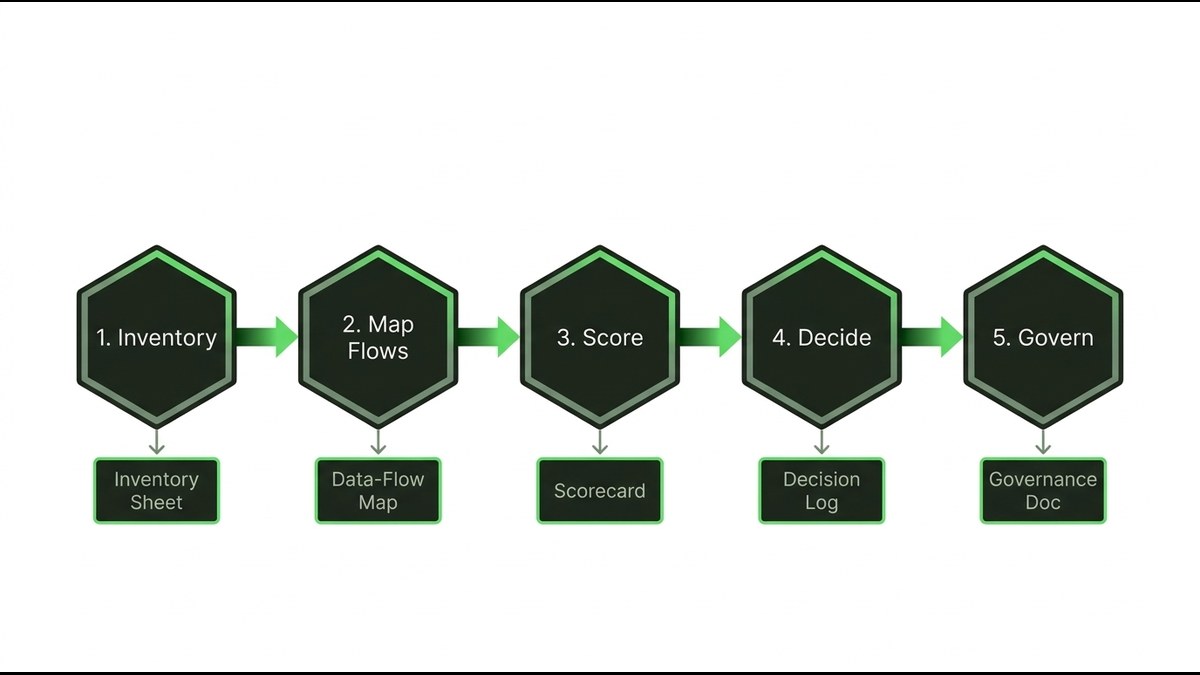
- 1. Inventory every tool and its cost. Artifact: an inventory sheet. Record the tool, its layer, owner, contract renewal date, seats, annual cost and connections. Do not trust the procurement list alone. Check card statements, single sign-on logs and team leads for shadow tools. The Effiqs Growth Stack Cost Calculator can total your annual tool spend.
- 2. Map data flows. Artifact: a data-flow map. For each tool, note what it reads, what it writes, which fields, in which direction and on which trigger. Mark every point-to-point connection. Name the system of record for each data object.
- 3. Score each tool on four tests. Artifact: a scorecard. Owner: one named person is accountable. Overlap: another tool already does this job. Output: the tool's data reaches the CRM or a pipeline report. Outlay: cost against actual usage. Score each test from zero to two and review the lowest totals first.
- 4. Decide keep, merge, retire or replace. Artifact: a decision log. Record each decision with its reason, the data to migrate, the risk, the approver and the date.
- 5. Document governance. Artifact: a governance document. It holds the owner register, the intake gate for new tools and the review cadence. Without this step, the audit decays.
Which tools should you cut or merge?
Cut a tool when another already does the job well enough, nobody owns it, or its data never reaches the CRM. Merge tools that write to the same fields. Keep the system of record and any tool supplying data that nothing else can. Use the decision matrix below on the lowest-scoring tools.
One warning applies to every row: do not automate a broken process faster. If lead routing is unclear or stage definitions disagree, a new platform will only spread the confusion more quickly. This is the principle we use in client work: diagnosis before delivery. The most expensive mistake in growth operations is executing on the wrong system fast. A consolidation project that skips the diagnosis simply moves the mess.
MarTech consolidation succeeds or fails on the same thing as the audit: whether each tool has an owner and a mapped data flow. Once definitions are settled, consolidation gets easier to execute. For example, lifecycle flows and routing wired into your CRM can replace several overlapping point tools with one governed flow.
Be cautious with replacement decisions. When the target is a new CRM, compare peer-reviewed capability and implementation readiness in Gartner's CRM reviews. Then test the shortlist against your own data-flow map. Reviews describe a product in general. Your map describes your business.
Treat stack optimization as structural efficiency, not a short-term trim. A one-off cut saves a renewal. Removing duplication and fragmentation permanently saves reconciliation hours every month and gives you reports you can defend.
- Keep. Trigger: the tool is the system of record, or supplies data nothing else can. Risk: keeping it by habit. Give it an owner and a review date.
- Merge. Trigger: two tools write to the same fields or serve the same team. Risk: the migration loses history. Map the fields and validate the data after each move.
- Retire. Trigger: another tool does the job well enough, nobody owns it, or its data never reaches the CRM. Risk: a hidden dependency breaks a report. Check the data-flow map first.
- Replace. Trigger: the tool owns a necessary job but fails on output or integration. Risk: you rebuild a broken process in a new tool. Fix the definitions before you migrate.
What is tool integration debt, and how do you pay it down?
Tool integration debt is the accumulated cost of quick, undocumented connections between tools: broken syncs, duplicate fields and mismatched definitions. Like financial debt, it compounds. Every new connection built on top of an undocumented one is harder to change later.
The analogy comes from software engineering, where technical debt is the long-term cost of shortcuts taken to ship faster. Revenue systems carry the same kind of debt, just in fields and events instead of code. Nobody chose it. It builds up through a hundred small decisions to wire two tools together quickly.
Integration debt blocks unified reporting in three ways. Two tools define "qualified lead" differently, so counts never match. A sync fails silently, so a field is stale and nobody knows. A connection has no owner, so nobody can change it without fear.
Poor CRM data has a real cost in wasted effort, misrouted leads and missed follow-up. But the practical cost is trust. When a leader cannot trust the report, they stop using it.
Avoid the cliché of "one source of truth" as a goal. It names an outcome without a mechanism. The mechanism has three parts: shared definitions, owned fields and governed flows. Data integrity and visibility are the end state, and you reach them by working through the order below, not by buying another tool.
- Definitions first. Agree on the meaning of each lifecycle stage, each conversion event and each core field. Write them down. Nothing else holds without this.
- Connections second. Document every connection and assign an owner. Retire point-to-point links in favor of governed flows. The CRM becomes the hub, and marketing systems feed it through documented paths.
- Dashboards last. Build reports only once definitions and flows are stable. Otherwise you encode the mess into the dashboard. Then Looker Studio dashboards can show one version of pipeline to every team.
How do you keep sprawl from returning?
Set a gate for new tools, review the stack on a fixed cadence, and tie each tool to a pipeline metric. Without ownership and a review rhythm, sprawl returns within a few quarters.
Audits decay for a simple reason. Tech stack governance is an ongoing job, not a project with an end date. Inherited stack chaos does not fix itself. Ongoing RevOps ownership is what turns a fragmented set of tools into a revenue operations tech stack you can report from.
Add a rule for AI tools. AI features and agents are a growing source of new tools, so they need the same gate as everything else. A tool that claims to "do it all" must still name an owner, show its data flow and pass the Overlap test.
Time your reviews to renewals. A renewal is the cheapest moment to retire a tool, because you can simply let the contract end. Before you commit to any renewal, check actual usage and confirm which reports depend on the tool's data.
Keep governance light enough to survive. A one-page register and a standing calendar slot beat a thick policy nobody reads. Ongoing stack optimization is mostly small, regular checks that stop duplication before it spreads. Build these four mechanisms:
- An intake gate. No tool is bought without a named owner, an overlap check against the inventory, a data-flow diagram and an exit date.
- An owner register. One list, one named person per tool, reviewed at every renewal.
- A review rhythm. Run a full stack review each quarter, with lighter checks in between. Look at quality as well as volume, and adjust quickly when quality drops.
- A metric per tool. Each tool maps to a pipeline metric. If you cannot name one, the tool fails the Output test.
What should you do next?
A revenue operations tech stack stays healthy only when each tool passes four tests. Owner: one named person is accountable. Overlap: no other tool already does the job. Output: its data reaches the CRM or a pipeline report. Outlay: cost matches actual usage.
Run those tests on your own stack this month. Start with the inventory and the data-flow map, since they take the least effort and expose the most. Then let the scorecard, not opinion, decide what to keep, merge or retire.
If you want a second pair of eyes before you cut anything, start with a diagnostic conversation. It should end with a shared view of the problem and one recommended next step.
- ✓ Define your revenue operations tech stack by data flow and handoffs, with one system of record and one owner per data object.
- ✓ Sprawl shows up as conflicting numbers and unowned tools long before it shows up as a budget line.
- ✓ The audit is a five-step data-flow and ownership exercise, and each step must leave behind a document.
- ✓ Cut by evidence from the scorecard and the data-flow map, and fix definitions before you migrate anything.
- ✓ Sprawl returns when nobody owns the stack, so keep the intake gate, the owner register and the review rhythm running.
FAQ
What is a revenue operations tech stack?+
It is the set of connected systems that capture, route, score, track and report on revenue from first touch to renewal. Typical layers are CRM, marketing automation, attribution and analytics, sales engagement, data enrichment and reporting. A tool belongs in the stack only if its data reaches the CRM or the pipeline report.
What is tool sprawl in RevOps?+
Tool sprawl is when tools overlap in function, sit unused, or hold conflicting versions of the same data. Common signs include two systems claiming to own pipeline, reports that need manual reconciliation, and tools nobody can name an owner for.
How do you audit a revenue operations tech stack?+
Inventory every tool and its cost, map data flows between tools, score each tool on owner, overlap, output and outlay, decide to keep, merge, retire or replace, then document governance. Diagnose before you cut, because removing a tool without understanding its data flow can break reporting.
How do you decide which tools to cut or merge?+
Cut a tool when another already does the job well enough, nobody owns it, or its data never reaches the CRM. Merge tools that write to the same fields. Keep the system of record and any tool that supplies data nothing else can.
What is tool integration debt?+
Tool integration debt is the accumulated cost of quick, undocumented connections between tools, such as broken syncs, duplicate fields and mismatched definitions. It compounds because each new connection built on an undocumented one is harder to change. Pay it down by fixing definitions first, then connections, then dashboards.
How do you stop tool sprawl from coming back after an audit?+
Set an intake gate for new tools, keep an owner register, review the stack quarterly and tie each tool to a pipeline metric. Time reviews to renewals, since that is the cheapest moment to retire a tool. AI tools should pass the same gate as everything else.
Sources
- [1]Peer-reviewed CRM capability and implementation readiness. Gartner, Gartner CRM reviews (2026), 2026.
- [2]AI features and agents are reshaping revtech. Forrester, Will AI Eat Your RevTech Stack?.